I have worked with WordPress for years and still look after more than ten WordPress sites today. So this article isn’t criticism from the outside but a review from daily practice. And in 2026 it comes out considerably worse than it did a few years ago.
WordPress was the right choice – 15 years ago
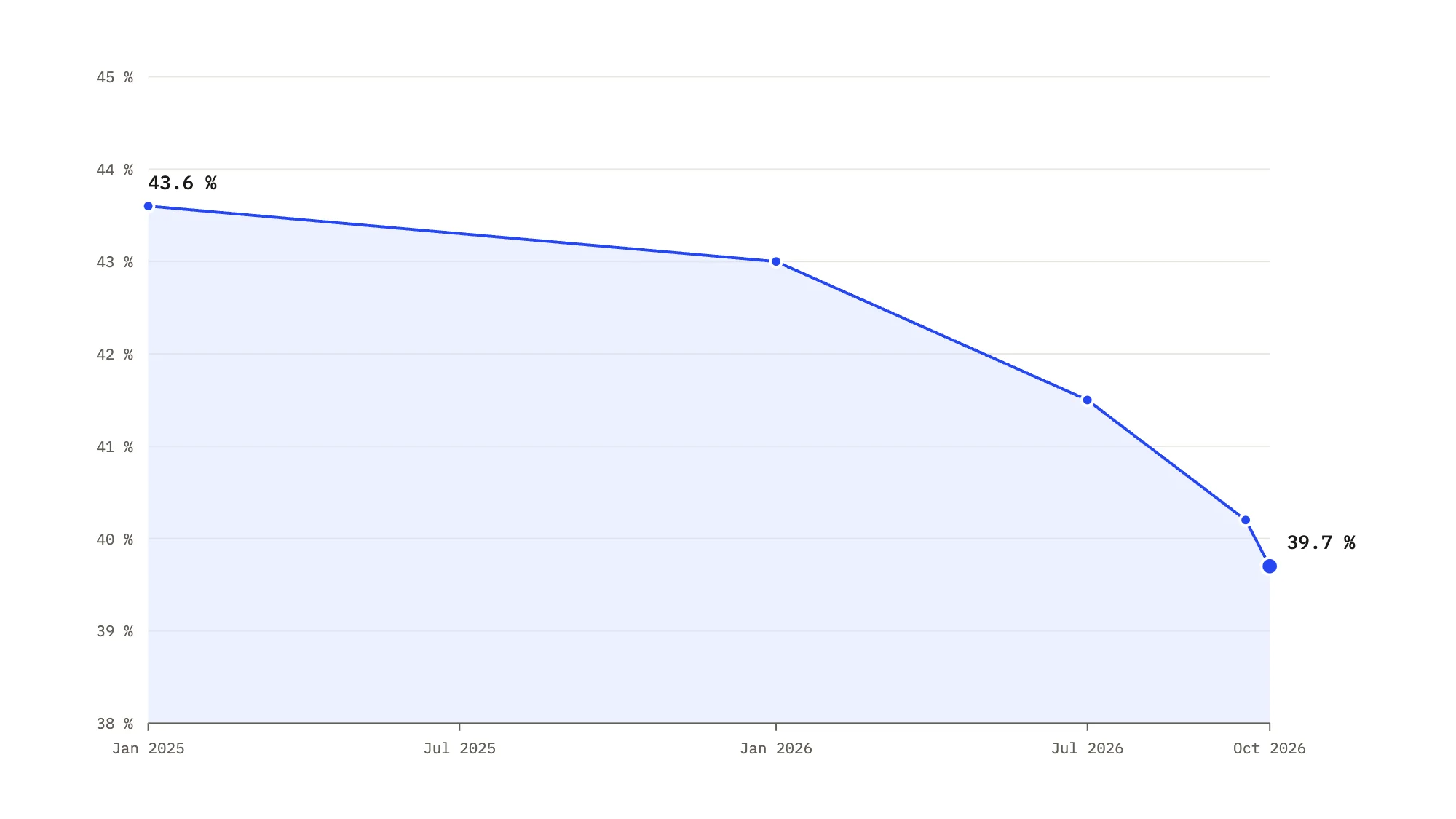
WordPress democratised the web: hosting for a few euros, a theme, some plugins, done. For blogs and simple company sites that was hard to beat for a long time. According to W3Techs, WordPress still runs 39.7% of all websites and 58.5% of sites with a known CMS. That’s a lot, but the share has been falling steadily since early 2025: from 43.6% to below 40%.
The decline alone isn’t an argument. The more interesting question is why businesses switch. In my projects it is almost always the same four reasons: security, speed, maintenance effort and the question of who actually controls the system.
Security: 11,334 new vulnerabilities in one year
Every year the security vendor Patchstack counts the newly reported vulnerabilities in the WordPress ecosystem. For 2025 there were 11,334 – up 42% on the previous year. 91% of them were in plugins, 9% in themes.
- new vulnerabilities in the WordPress ecosystem in 2025 (+42%)
- 11,334
- new vulnerabilities in the WordPress ecosystem in 2025 (+42%)
- were still unpatched when they were made public
- 46%
- were still unpatched when they were made public
- weighted median until first exploitation
- 5 hrs
- weighted median until first exploitation
The last number is the one that matters. The median time between a vulnerability being published and the first attacks is five hours. About half of the severe vulnerabilities are exploited within 24 hours. If you install updates once a week or once a month, you are simply exposed during that window.
What actually happened in 2026
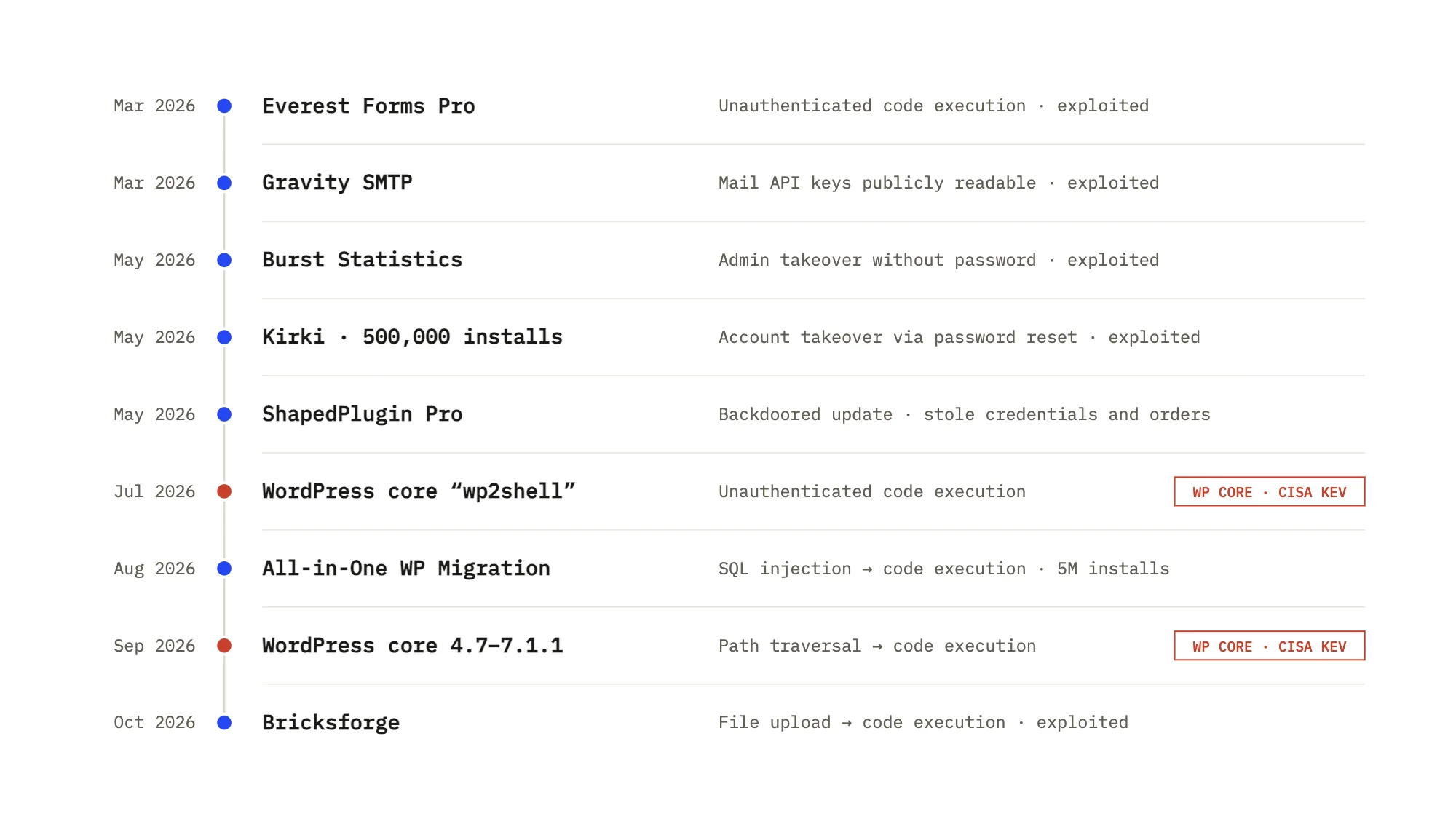
- Gravity SMTP (March): An endpoint of the mail plugin handed any visitor without a login a system report – including the API keys and tokens of the configured mail providers. Wordfence reports blocking more than 17 million attack attempts.
- ShapedPlugin Pro (May): Attackers slipped a backdoor into three premium plugins through the update mechanism. It stole credentials, session cookies, 2FA secrets, the database credentials from wp-config.php and WooCommerce orders from the last three months, including payment-method information. The site owners did nothing wrong – they installed an update.
- Burst Statistics and Kirki (May): Two plugins with 700,000 installs between them allowed admin accounts to be taken over without a password. Both were actively attacked soon after disclosure.
- All-in-One WP Migration (August): A flaw in the backup plugin with 5 million installs allowed code execution via SQL injection. Two weeks after the fix, according to BleepingComputer, only about 35% had updated.
Why plugins are the root problem
A WordPress plugin is code from a third-party developer running with full privileges in the same process as your website – with access to the database, the files and all customer data. Grown business sites quickly collect a few dozen of them; a WooCommerce store has 58 active plugins on average, according to Metorik. Each one is a door, and the site is only as secure as its worst-maintained plugin.
On top of that, premium plugins are often distributed outside WordPress.org through their own update servers. That is exactly where the ShapedPlugin attack struck. According to Patchstack, 29% of all reports in 2025 concerned premium or freemium components – with almost three times as many critical zero-days as free plugins. And hosting firewalls are no substitute: in Patchstack’s tests they blocked only 12 to 26% of attacks.
How is your WordPress site doing?
In the migration check I review your website’s plugins, PHP version, security and rankings and tell you whether a move is worth it – for €390, fully credited if you go ahead.
Performance: only every second WordPress site is fast enough
Google rates the loading experience through the Core Web Vitals: how fast the main content appears (LCP), how quickly the page responds to input (INP) and how stable the layout stays (CLS). Real-user data from Chrome shows that in September 2026 only 48.3% of WordPress sites passed on mobile.
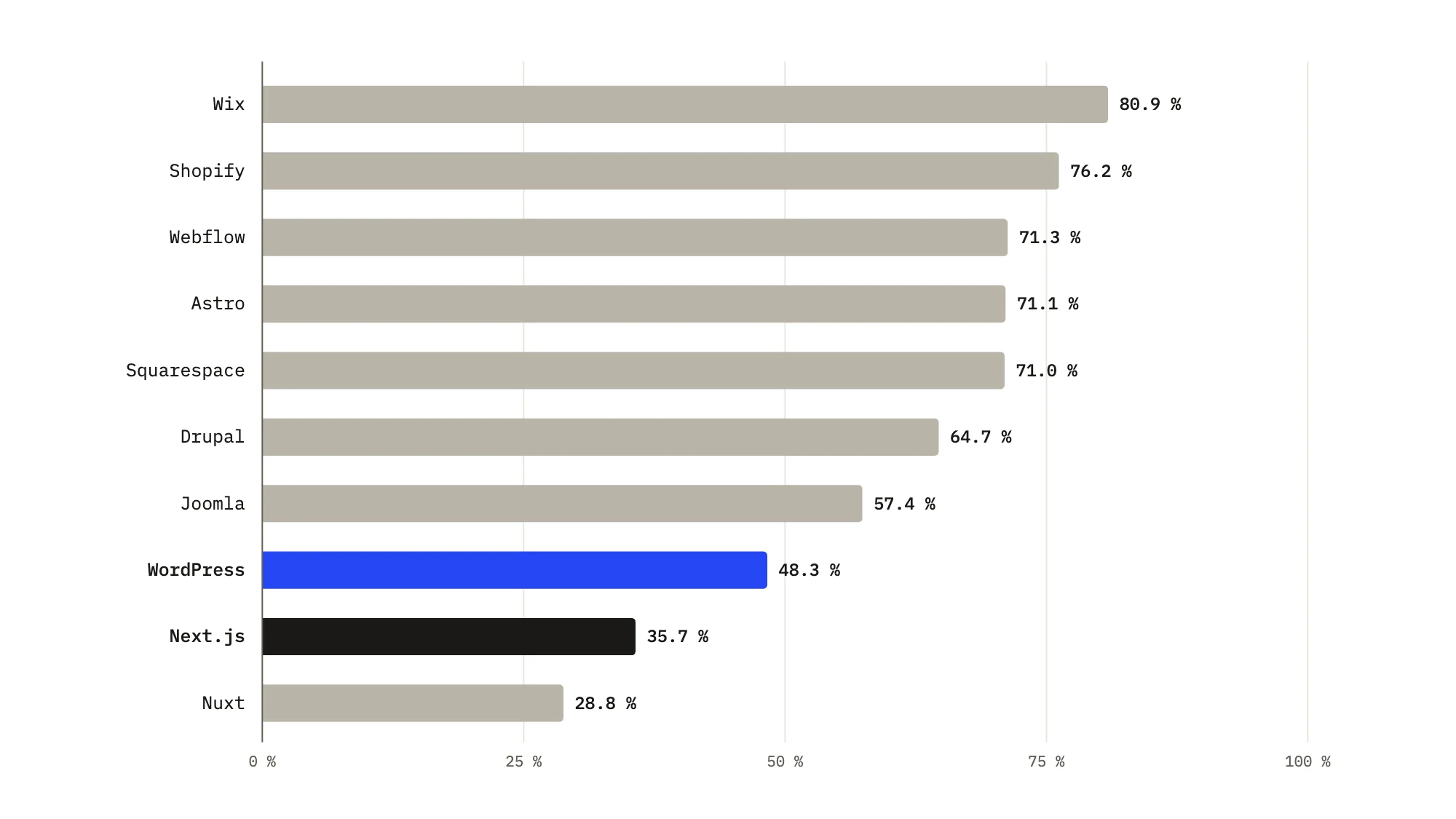
An honest note before anyone asks: Next.js does even worse in this statistic (35.7%). The framework alone doesn’t make a fast website. Many Next.js sites ship huge JavaScript bundles, render everything in the browser or load unfiltered tracking scripts. Speed comes from architecture decisions, not from a logo in the footer.
The difference is who makes those decisions. With WordPress, theme and plugin vendors make them, building for thousands of sites at once: a page builder loads its CSS and JavaScript on every page, a slider plugin loads where there is no slider, a form plugin puts its scripts across the whole frontend. The median WordPress page weighs 2.7 MB on mobile, and its median Lighthouse performance score is 41 out of 100, according to the Web Almanac 2025. Caching plugins hide that, but they are yet another plugin.
With a custom-built Next.js site, every one of those decisions sits with you or your developer: pages are pre-rendered, images are served automatically at the right sizes and in modern formats, and JavaScript reaches the browser only where it is needed. That isn’t automatic – but it is possible without fighting a theme.
Maintenance: the update treadmill
Running a WordPress site responsibly means updating core, theme and plugins every week – and then checking that everything still works, because plugins from different vendors are never tested together. In practice the opposite often happens: updates are postponed until “there’s time”. The server software numbers show exactly that.
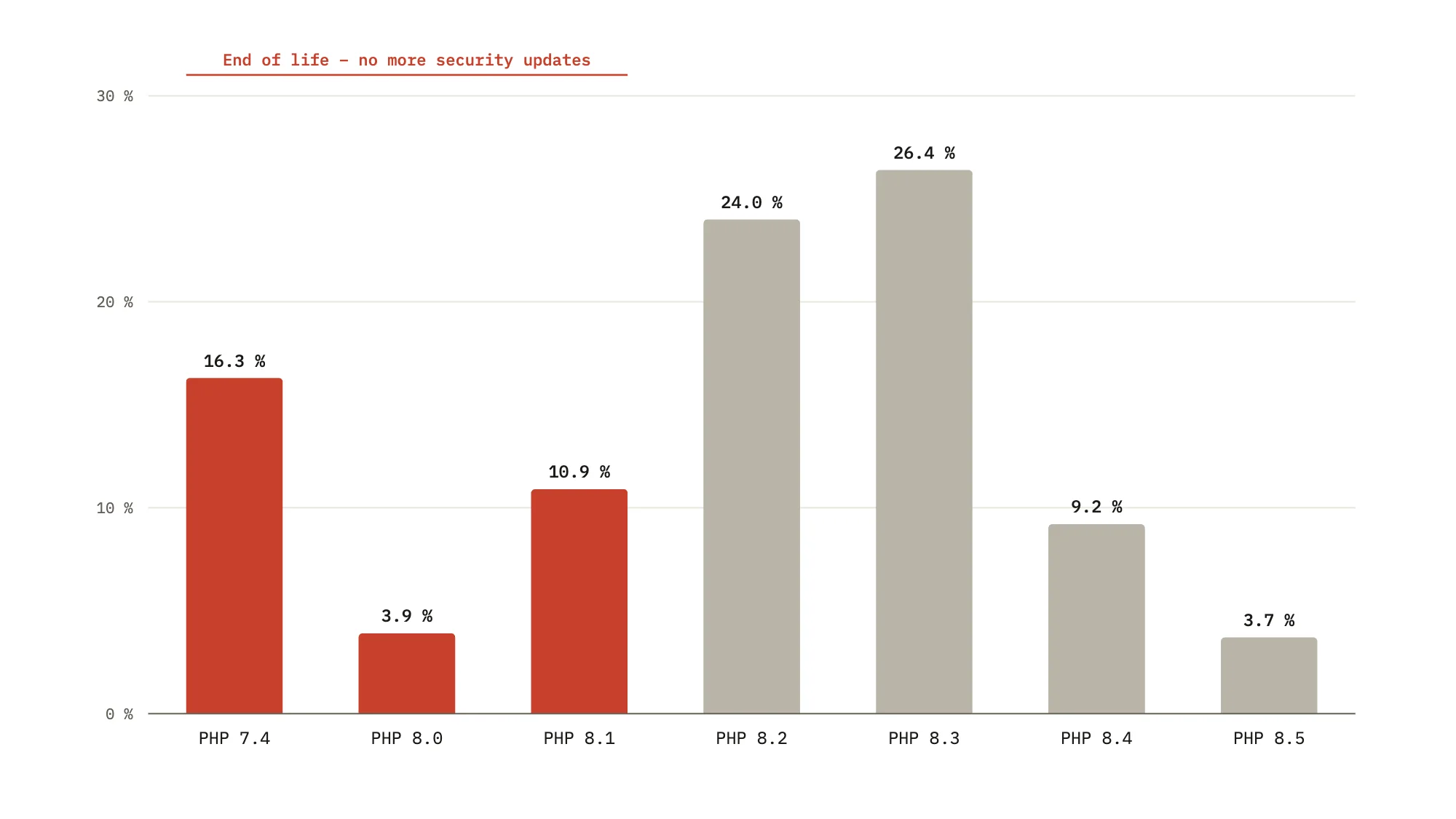
About 37% of all WordPress sites run on PHP 8.1 or older – versions that no longer receive security updates. And support for PHP 8.2, which runs another 24%, ends on 31 December 2026. A PHP upgrade is rarely one click with WordPress, because older plugins tend to break. So it gets left.
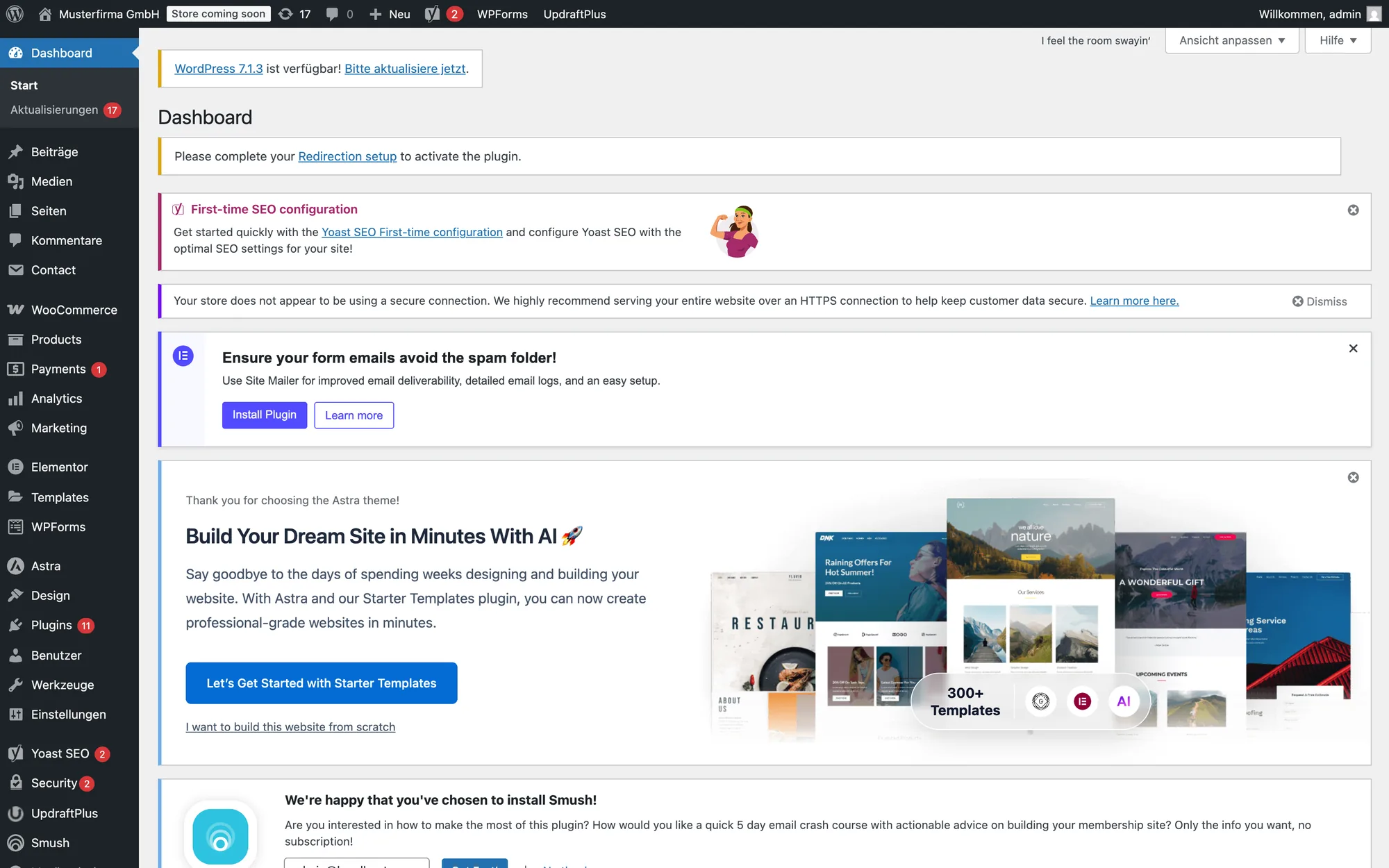
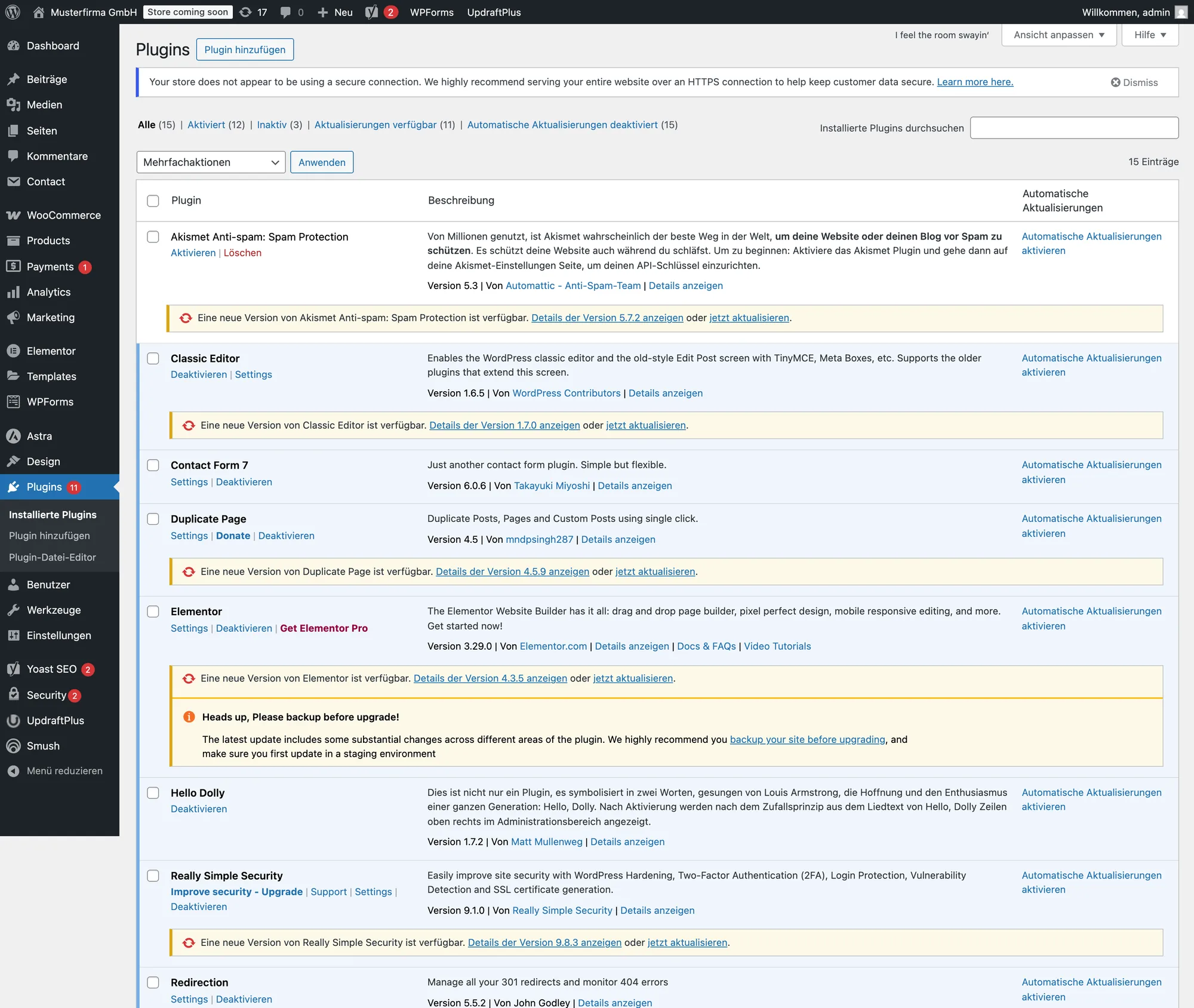
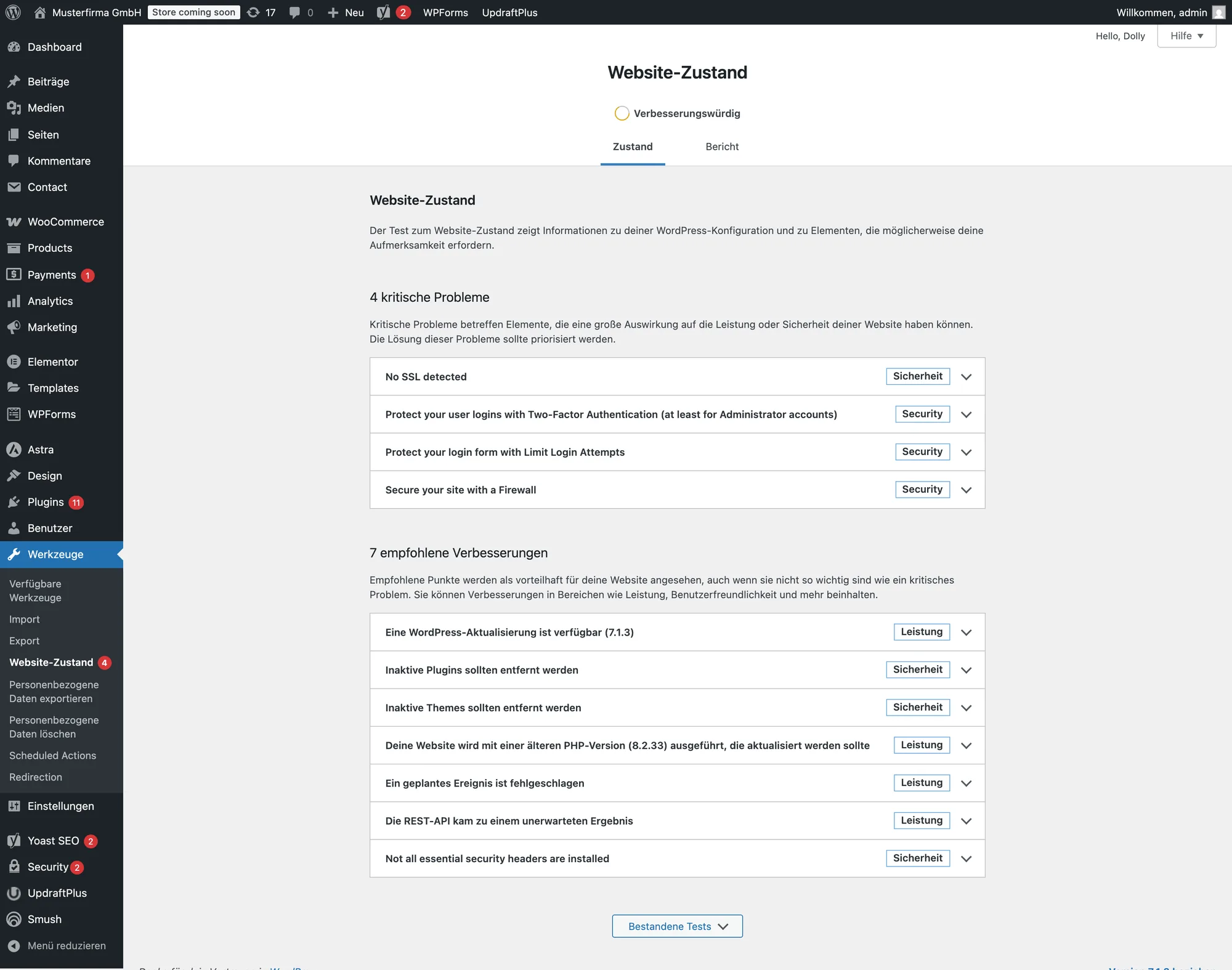
What that feels like day to day is shown by a recreated, typically grown company installation with a theme, a page builder, a shop and 15 plugins:
Who actually controls WordPress?
Since October 2024, Automattic – the company of WordPress co-founder Matt Mullenweg – and the host WP Engine have been fighting in court. For site owners this became very practical: in October 2024 WordPress.org took over the popular Advanced Custom Fields plugin as “Secure Custom Fields” – and sites with auto-updates enabled were switched to the new version automatically. At the end of September 2026 the court allowed most claims to proceed, antitrust ones included. There is no end in sight.
You don’t need to take sides in this dispute to see the problem: an ecosystem that runs 40% of the web depends on the decisions of very few people. As a site owner, you have no say in them.
Content: page builders instead of structure
At its core, WordPress stores page content as a block of HTML in a single database field. With Gutenberg or a page builder that becomes a mix of content and layout. It feels flexible at first but backfires: reusing the same content in an app, a newsletter or on a second brand website is barely possible. AI workflows – translations or drafts, for example – lack the structure a model can reliably work with. And editors spend more time fixing spacing than writing content.
When WordPress still fits
To be fair, WordPress isn’t the wrong choice for everyone. It can still make sense if
- you run a simple blog or a small site on a very tight budget,
- the site gets by with a few well-maintained plugins,
- it sits on managed hosting with automatic updates and monitoring,
- or your team knows WordPress and carries the maintenance effort deliberately.
But as soon as a website is meant to generate leads, process customer data, be multilingual or talk to other systems, the maths changes.
Why I now build with Payload CMS
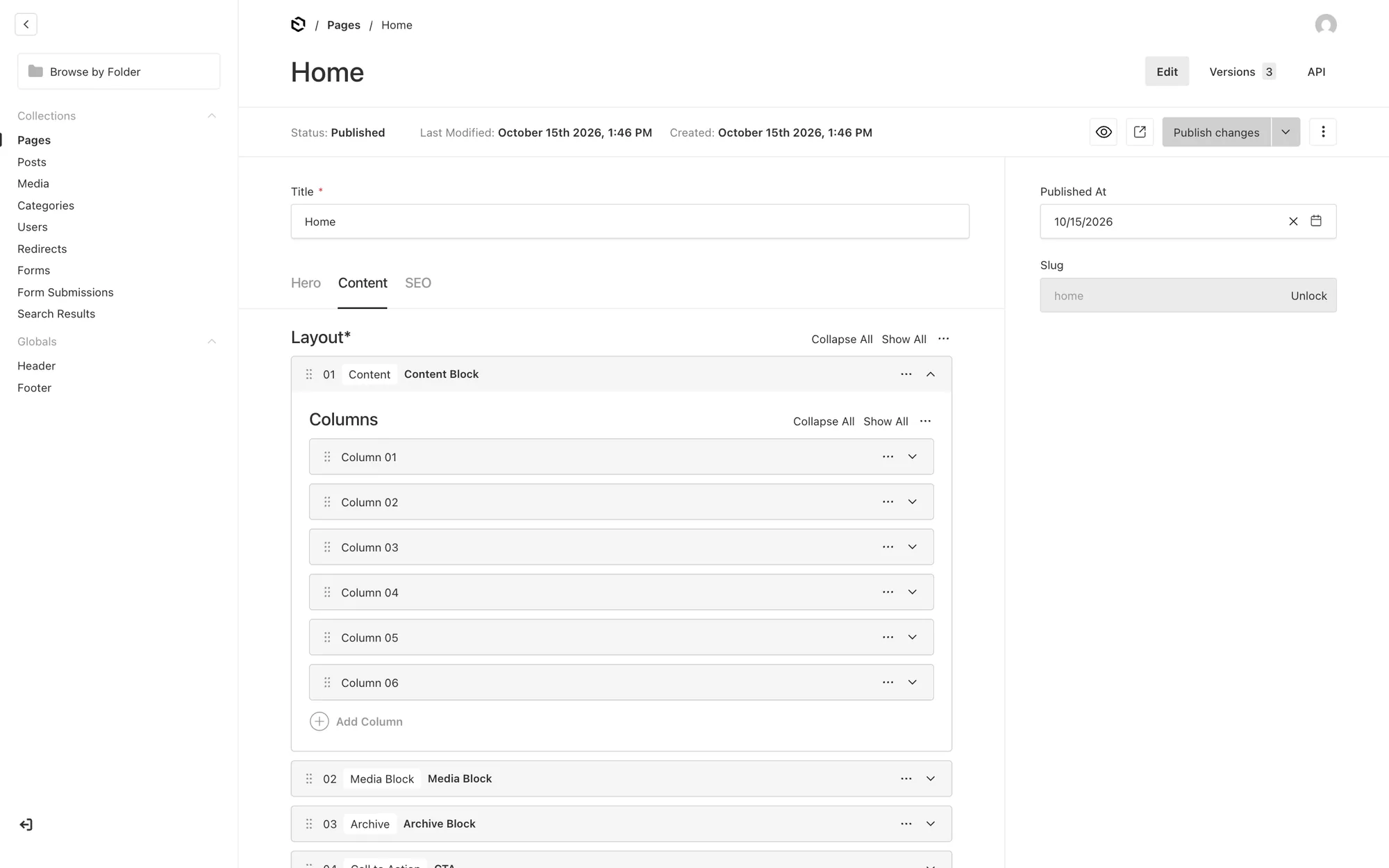
Payload is an open-source CMS (MIT licence) that runs directly inside a Next.js application. It has been part of Figma since June 2025 and, according to the company, remains open source. At NCA NewConcept Agentur I have moved several projects from WordPress to Payload; these are the differences that matter in practice:
- No marketplace of plugins from strangers. Content model, roles and features are code in your own repository. Every dependency is chosen deliberately, versioned and tested before deployment.
- A smaller attack surface. The admin panel can live on its own domain or be restricted by IP; the public website can be served fully static.
- Structured content. Fields, blocks and relations instead of HTML soup. The same content feeds website, app, newsletter or AI workflows.
- Speed by design. Because frontend and CMS are one application, only the project decides which JavaScript reaches the browser – no theme, no page builder.
- You own everything. Code and data stay with you, hosted in the EU. No per-seat licence fees, no lock-in to a SaaS vendor.
How a move from WordPress to Payload works
- 1.Audit: Which content, plugins and features exist – and which of them are actually needed? Plus current rankings and traffic from Search Console.
- 2.Content model: Posts, pages and page-builder layouts become clean collections and blocks.
- 3.Scripted migration: Text, images, categories and SEO meta data are moved over automatically and spot-checked.
- 4.New frontend: Components are built for you – fast, accessible and in your own design.
- 5.Launch without losing rankings: Every old URL gets a 301 redirect; sitemap and Search Console are updated.
Modernise your WordPress site?
I move existing WordPress sites to Payload CMS and Next.js – with content carried over, custom components and noticeably better speed. All the details, prices and examples are on the Payload CMS page.
- [1]Patchstack – State of WordPress Security in 2026
- [2]WordPress.org – WordPress 7.0.2 Security Release (Juli 2026)
- [3]CERT.at – Kritische Sicherheitslücken in WordPress (20.07.2026)
- [4]NVD – CVE-2026-63030 (wp2shell)
- [5]NVD – CVE-2026-87902 (WordPress core path traversal)
- [6]WordPress.org – Version 7.1.2
- [7]CISA – Known Exploited Vulnerabilities Catalog
- [8]NVD – CVE-2026-4020 (Gravity SMTP)
- [9]BleepingComputer – ShapedPlugin update flow hacked
- [10]BleepingComputer – Burst Statistics auth bypass exploited
- [11]BleepingComputer – Kirki flaw exploited
- [12]BleepingComputer – WordPress backup plugin flaw exposes millions of sites
- [13]HTTP Archive – Core Web Vitals Technology Report
- [14]Web Almanac 2025 – CMS
- [15]W3Techs – Usage statistics of WordPress
- [16]WordPress.org – PHP version statistics
- [17]php.net – Supported Versions
- [18]Metorik – WooCommerce plugin statistics
- [19]WordPress.org – Secure Custom Fields (Oktober 2024)
- [20]Payload – Payload is joining Figma (Juni 2025)
- [21]Payload – Security advisories on GitHub
About the author
Daniel Granzer is a full-stack web developer in Vienna. At NCA NewConcept Agentur he builds platforms with Next.js and Payload CMS and has moved several projects from WordPress to Payload there.